Premier Real Estate Photo Editing Techniques to Ignite Buyer Enthusiasm
- trunga1331
- 10 thg 2
- 6 phút đọc
Why is photo editing crucial in real estate? Raw photographs frequently suffer from adverse weather conditions, inadequate illumination, or improper perspectives, which can render a property far less attractive. Employing real estate photo editing techniques not only amplifies the visual charm but also empowers potential buyers to picture themselves residing in the home. This article delves into six leading real estate photo editing strategies that truly resonate with homebuyers.
The Indispensable Role of Real Estate Photo Editing
Prior to exploring the specific techniques, it's vital to grasp their significance. As per the National Association of Realtors (NAR), more than 97% of prospective homebuyers commence their hunt online, with 85% regarding photographs as the paramount consideration when choosing to inspect a property or arrange a showing. In today's rapid browsing habits, buyers sift through numerous listings in mere moments, and any images that appear out of focus or dimly lit are promptly disregarded.

Photo editing delivers multiple advantages:
Sparks favorable sentiments: Cozy lighting and lively hues ignite creative visualization.
Enhances property valuation: Residences showcased with expertly edited images fetch higher rates per square foot.
Preserves genuineness: Sophisticated editing techniques avoid misleading representations, always disclosing the use of virtual staging where applicable.
6 Leading Real Estate Photo Editing Techniques That Elicit Powerful Buyer Responses
Sky Replacement: Converting a Dismal Sky into a Pristine Azure Expanse
Within real estate imagery, an ashen or overcast sky invariably serves as the primary detractor for outdoor shots. Regardless of the architectural splendor or optimal lighting, a lackluster sky promptly dulls the entire composition, rendering it uninviting. Sky replacement emerges as a swift and potent remedy to this challenge. From a visual psychology viewpoint, a vivid blue sky accompanied by uplifting illumination instills sensations of hopefulness, security, and serenity in observers. This encourages buyers to mentally inhabit the space, transcending mere passive viewing.


Comprehensive Instructions: In Adobe Photoshop, editors may employ the Lasso tool or the dedicated Select Sky feature to meticulously delineate the existing sky region. Subsequently, incorporate a replacement sky layer sourced from an internal collection or premium free repositories such as Unsplash. Proceed to refine the blending mode—typically opting for Lighten or Screen—while integrating a layer mask, and calibrate brightness and coloration to ensure the new sky merges organically with the underlying landscape.
For those prioritizing efficiency, Adobe Lightroom incorporates sky replacement capabilities via third-party plugins or embedded AI functionalities, markedly reducing the time required for edits.
Twilight Editing: Infusing Your Property with Enhanced Warmth and Opulence
Twilight editing represents a method for reimagining standard daytime outdoor photographs as captivating sunset or dusk scenarios. This constitutes the "prime time" in real estate photography, characterized by skies in tones of violet, rose, and profound navy, where indoor illuminations start to radiate, enveloping the home in a sense of comfort and prominence amid its environment. Relative to conventional daytime captures, twilight renditions impart a heightened aura of elegance and seclusion.


Comprehensive Instructions:
Layer segmentation: Initiate the process in Photoshop by loading the image and positioning the foundational (ambient) layer at the base. Introduce supplementary layers, activate them individually, apply a black mask to each, and shift the blending mode to Lighten to safeguard essential highlights. Refine illuminated zones: Utilize a gentle brush set to low flow for incorporating delicate accents on targeted areas, if necessary. Consolidate layers and establish a pristine backdrop: Merge all layers to simplify the ensuing sky selection.
Sky substitution: Select a superior-quality sunset or twilight sky image, position it beneath the primary layer, and employ the Quick Selection tool in conjunction with Select and Mask for precise sky delineation and refinement.
Sky integration and harmonization: Reposition the new sky to align fluidly with the principal composition; modify the mask, incorporate feathering, and edge adjustments to achieve a smoother, more authentic appearance.
Concluding refinements: Reload the file into Lightroom or analogous post-production tools to calibrate contrast, exposure, and saturation levels, guaranteeing that the sky remains synchronized with the foreground elements.
Lawn Replacement: Boosting Initial Curb Appeal
In real estate photography, the forefront yard and grass areas are pivotal in forging an initial perception. A discolored, uneven, or scorched lawn not only imparts a sense of lifelessness to the home but also subtly conveys neglect in property upkeep. Achieving a consistent, verdant, and authentic lawn instantly refines the home's exterior, rendering it more welcoming and accessible. This forms a cornerstone of curb appeal—the property's allure as observed from the roadway.


Comprehensive Instructions: In Photoshop, the most expedient approach involves isolating the lawn segment via Selection or Mask tools, followed by color modifications using the Hue/Saturation adjustment. Elevate the Green channel, marginally diminish the Yellow component, and precisely adjust Lightness to yield a lusher grass appearance while upholding its inherent texture.
For lawns deemed excessively blemished or irreparable through mere color tweaks, a superior alternative entails cloning or importing verdant grass from an alternative photograph. Subsequently, apply a soft mask and synchronize colors and lighting to facilitate a fluid integration with the adjacent scenery, circumventing any artificial "cut-and-paste" aesthetic.
Object Removal: Eliminating Clutter to Amplify Spatial Perception
Within real estate images, disarray acts as an insidious adversary that erodes the apparent worth of an area. Items like personal effects, entangled cables, storage boxes, superfluous objects, or ill-placed furnishings contribute to a confined, disorderly, and diverting ambiance for viewers. The object removal process in photo editing is essential for eradicating extraneous elements, fostering a tidier, more expansive, and impartial atmosphere.

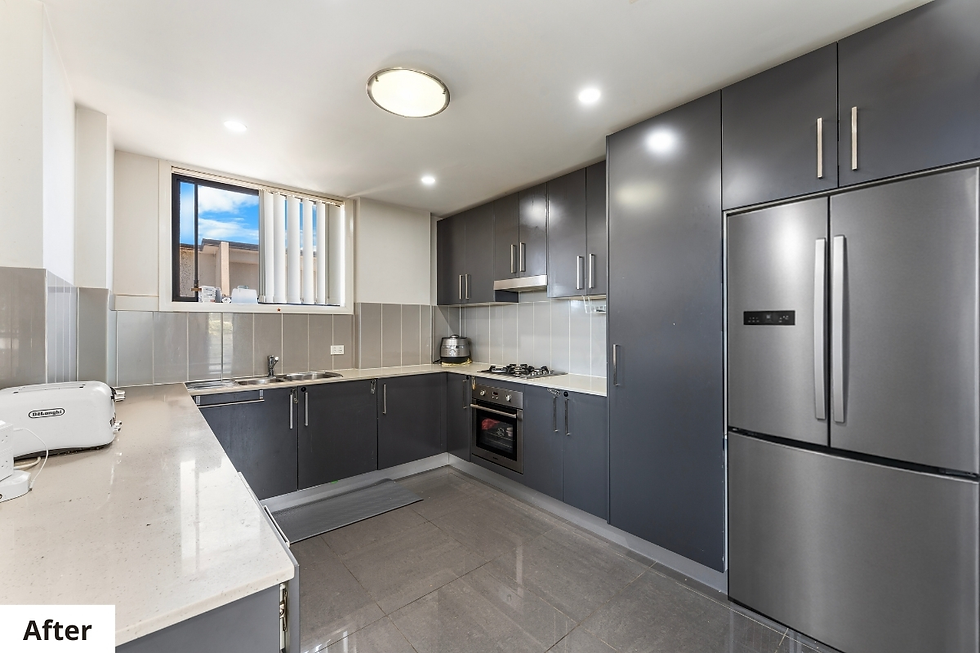
Comprehensive Instructions: In Photoshop, leverage instruments such as Content-Aware Fill, the Remove Tool, or Clone Stamp to excise minor articles, wiring, blemishes, or surplus items. Edits must be exacting and understated to ensure the underlying surface maintains its organic texture post-removal.
In instances where rooms appear overly vacant or lackluster following object elimination, incorporate virtual staging to introduce simulated furnishings that align with the room's dimensions, aesthetic, and lighting scheme. This methodology sustains cleanliness, introduces a central focus, and facilitates effortless conceptualization of the space's purpose.
For further details: AI-Driven Object Removal: Achieving Greater Speed, Purity, and Precision?
Perspective Correction: Reinstating Architectural Integrity
Photographers commonly deploy wide-angle lenses to encompass expansive interiors. Yet, a primary limitation of these lenses is the induction of distortions: walls may bow, pillars lean, floors incline, or critical lines deviate from parallelism. Absent rectification, such flaws impart an amateurish vibe to the architecture and diminish the property's appraised value. Perspective correction is a methodology that reconfigures viewpoints, restoring architectural elements to their accurate alignments, thereby evoking impressions of robustness, equilibrium, and trustworthiness in the structure.

Comprehensive Instructions: In Photoshop, the Lens Correction filter (accessible via Filter > Lens Correction) facilitates accurate adjustments for distortion and perspective. Editors can manipulate the Vertical and Horizontal sliders or utilize an overlay grid to straighten walls, columns, and doorways. Moreover, the Transform Tool (encompassing Skew, Distort, and Warp functions) is frequently applied for localized refinements.
Lightroom offers the Upright tool (with options like Auto, Vertical, or Full) for instantaneous alignment of linear elements via a single click, making it optimal for streamlined operations. Post-application, trim the image to preserve compositional harmony.
Color Correction and Brightness Adjustment
Color correction paired with brightness tuning equilibrates tonal qualities, augments contrast and luminosity, resulting in environments that appear rejuvenated, immaculate, and faithful to actuality. Images plagued by erroneous color casts (such as yellowish or bluish hues) or deficient lighting can portray spaces as antiquated and unappealing, irrespective of compositional excellence.


Comprehensive Instructions: In Lightroom, the standard workflow commences with Auto Tone to establish a preliminary balanced foundation. Then, deploy the White Balance Eyedropper to select neutral white or gray surfaces (e.g., walls, ceilings, or draperies) to normalize color tones.
Subsequently, elevate Contrast to a balanced extent (typically ranging from +10 to +20) to deepen dimensionality, and integrate a modest Dehaze application to heighten sharpness without introducing abrasiveness.
For enhanced command over illumination, Photoshop's Curves tool permits the illumination of shadowed regions, retention of details in highlighted zones, and the establishment of seamless tonal shifts throughout the image.
Professional Real Estate Photo Editing via the Picpee Platform
For expert-level real estate photo editing, Picpee emerges as a reliable platform endorsed by numerous agencies, photographers, and marketing groups across the globe. Picpee functions as a smart intermediary, linking real estate firms and photographers with a cadre of proficient editors hailing from diverse nations, thereby streamlining the editing workflow for rapidity, adaptability, and superior quality. Through Picpee, users can effortlessly select an editor aligned with their preferred aesthetic. Clients submit intricate editing directives and obtain completed outputs sans the need for overseeing or instructing an in-house staff.
Picpee delivers an extensive suite of specialized real estate editing offerings, encompassing HDR processing, virtual staging, day-to-twilight transformations, lawn substitutions, object eliminations, perspective rectifications, color and lighting optimizations, as well as real estate video enhancements. These services are designed to produce lifelike, professional visuals that immediately enthrall observers.
Moreover, Picpee emphasizes superior user interaction through transparent, intuitive processes and unmediated client-editor exchanges. This guarantees precise fulfillment of requests, curtailment of revisions, and accelerated timelines.
A notable advantage of Picpee lies in its adaptable, project-oriented pricing structure, accommodating both solo practitioners and corporate entities. All fees are transparently presented prior to commitment, enabling effortless budget oversight and elimination of unforeseen charges.
Complementing its online interface, Picpee provides applications available on Google Play and the Apple App Store, empowering users to reserve services, monitor advancements, and retrieve finalized products from any location at any time. This proves particularly advantageous for agencies and photographers engaged in fieldwork.
Conclusion
These real estate photo editing techniques transcend mere aesthetic improvements; they resonate emotionally with buyers, enabling your listings to distinguish themselves amidst a sea of rivals. Begin your journey with complimentary resources such as Lightroom's trial version, or explore specialized outsourcing options like those offered by Picpee.


Bình luận