Top Real Estate Photo Editing Software recommend
- trunga1331
- 16 thg 12, 2025
- 5 phút đọc
In real estate photography, producing high-quality images is paramount. Editing plays a vital role in transforming ordinary shots into compelling visuals for potential buyers, significantly boosting a property's appeal.
Real estate photo editing software empowers photographers to enhance lighting, improve color accuracy, remove unwanted elements, and creatively craft images that effectively sell properties.
This article will delve into the latest real estate photo editing software available, highlighting their key features and demonstrating how they can aid in achieving professional results. Additionally, we will share editing techniques and tips to save valuable time.
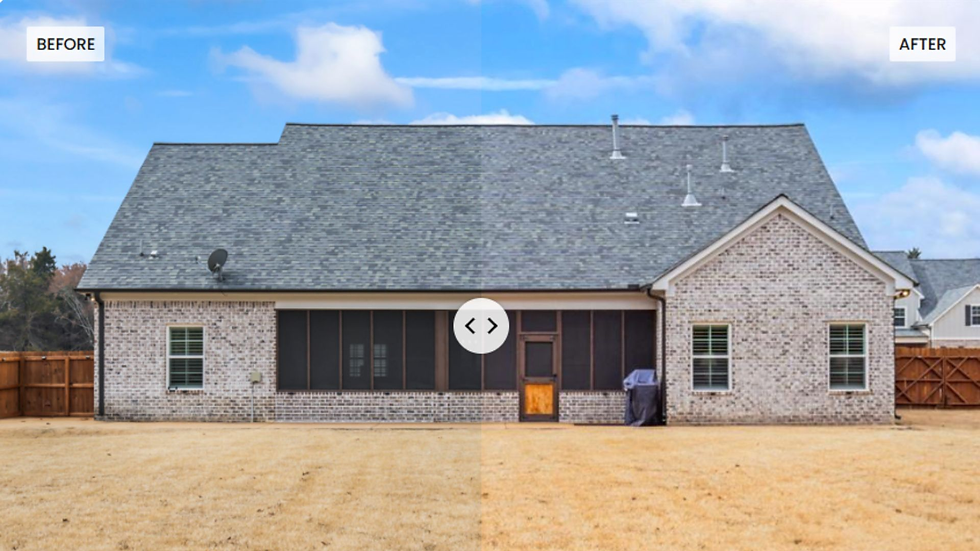
Why Editing is Essential in Real Estate Photography?
In a competitive market, real estate visuals must be exceptionally engaging to stand out. While proper framing is crucial, editing allows for precise adjustments to lighting and contrast, enhancing a photo's overall appeal.
Achieving accurate white balance ensures true-to-life color representation. Removing distractions like wires, blemishes, or clutter cleans up the image. Sky replacement can dramatically improve outdoor shots. Correcting lens distortion and straightening verticals creates a balanced composition.
Adding depth and detail emphasizes key features. Virtual staging allows for exploring various room layouts. Noise reduction and image quality enhancement in low light conditions improve overall quality. Given that potential homebuyers often form their opinions based on online images, professionally real estate photo editing can significantly expedite sales and increase property value.
Let's now explore the leading real estate photo editing software options in detail.
Key Features to Look for in Real Estate Photo Editing Software
The toolset helps editors communicate with the computer to decide how each part relates to the others. They also help in the investigation of the role played by the editor in the manipulation of the work.
User-friendly interface: An intuitive and easy-to-use software with accessible tools is essential for a quick and efficient workflow. Applications with drag-and-drop functionality offer an added advantage for photographers in managing their tasks.
Advanced Editing Capabilities: Layer-based editing is fundamental for complex image manipulation. AI-powered tools are essential for automated enhancements.
Batch Processing: The ability to process multiple images simultaneously is crucial in real estate photography. A program with batch editing capabilities saves significant time by automating repetitive tasks.
HDR Processing: Combining multiple exposures allows for creating high dynamic range images. This technique can brighten dim areas and enhance exterior shots, creating a sense of the interior's atmosphere.
Cloud Integration: Enables easy transfer of edited photos across devices. Cloud storage also ensures photo availability and accessibility.
1. Adobe Photoshop: Best for Advanced Editing and Retouching
Adobe Photoshop is a dominant force in real estate photo editing, offering exceptional tools for image enhancement and manipulation. Its extensive features provide photographers with the creative freedom to fully satisfy their clients. This comprehensive suite is ideal for professionals seeking ultimate control over digital photos and for those looking to manage and refine their images.
Main Characteristics:
Layer-based editing provides complete control and boundless creative possibilities.
Sky replacement tool enhances the appeal of outdoor photos.
Content-Aware Fill removes unwanted objects seamlessly.
Automatically adjusting the brightness when doing multiple exposures simplifies adaptive processing.
Correct Perspective Tool straightens horizons, creates texture, and recovers missing or low-contrast detail.
The noise reduction tool improves image quality; DeNoise is a more effective tool.
AI-powered quick selection and masking tools refine masks and add effects.
Blending modes emulate lighting effects, adding depth and realism.
The details panel sharpens various details and features a brush for precise application.
Advantages and Disadvantages:
Pros:
Offers exceptional control over image manipulation.
Provides a comprehensive set of retouching tools.
Supports a wide range of plugins for extended functionality.
Cons:
Has a steep learning curve for beginners.
Requires a subscription-based payment.
Can be slow when processing large files.
2. Adobe Lightroom: Best for Batch Editing and Color Correction
Adobe Lightroom is a great platform for preparing new properties for future guests, offering features like editable photos with software features that synchronize with the built-in environment.
Main Characteristics:
Presets and batch editing simplify and accelerate mass transformations.
Automatic Sky Replacement.
Lens correction fixes image distortions, improving quality.
Spot removal and healing brush tools address imperfections and blemishes.
Cloud system integration enhances workflow.
HDR photo editing feature including split toning.
High-quality sharpening preserves image appearance and minimizes disk space usage.
The histogram visualizes value distribution.
Effective noise reduction even at high ISO settings like 12800.
Pros & Cons:
Pros:
Easy to learn and use, even for beginners.
Repeatable processes allow for easy correction of mistakes.
Ideal for bulk image processing.
Sharing capabilities facilitate collaboration among team members through synchronization and shared progress.
Cons:
Limited color correction and retouching tools compared to Photoshop.
Subscription-based pricing model.
Lacks the advanced color-specific correction needed for extremely fine detail editing.
3. Luminar Neo: Best for AI-Powered Editing
Luminar stands out as an AI-assisted photo editor offering numerous automatic functionalities and third-party plugins beyond sky replacement and tone finalization.

Main Characteristics:
AI can change the sky and improve the light.
Tools for removing distracting objects from photos.
Object removal cleans up clutter.
Preset adjustments enhance neon colors.
Portrait enhancement improves photo quality with mask filters for digital makeup.
AI masking controls the roughness of light/shade.
AI tools control contrast and shadows.
AI noise reduction cleans up noisy images, although some noise may remain in dark sections.
The ray of light tool adds light from any source.
Pros & Cons:
Pros:
User-friendly interface.
Time-saving AI: Replaces the sky and improves contrast.
Cons:
Lacks advanced editing and retouching capabilities compared to Photoshop.
Requires careful matching of tones for accurate photo representation.
Can struggle with large files, potentially overloading the app or computer.
4. Photomatix Pro: Best for HDR Editing
High Dynamic Range (HDR) imaging is essential in digital photography, producing images with a full range of brightness values to realistically reproduce scenes. Photomatix Pro excels in HDR photography and image creation.

Main Characteristics:
HDR processing, especially tone mapping.
Easily removes ghosting artifacts from moving objects in bracketed exposures.
Setting profile adjustment simplifies applying different styles.
Batch processing streamlines workflow.
Tone compression recovers detail in dark areas while increasing dark-to-light contrast.
Multiple exposure blending combines photos with varying brightness or settings.
Pros & Cons:
Pros:
Excellent for images with high contrast.
User-friendly interface for quick and easy use.
One-time purchase option available.
Cons:
Limited soft retouching tools.
Lacks detailed image editing tools.
Best results are achieved with bracketed exposures, de-ghosting, and a natural HDR look.
5. Corel PaintShop Pro: Best Budget-Friendly Alternative
Corel PaintShop Pro 2022 provides AI-powered features. This app allows you to create wonderful photos without necessarily needing a subscription.
Main Characteristics:
AI enhances image quality and speeds up editing.
HDR Features and RAW options.
Perspective correction for architectural photos.
Object removal tools.
Supports 360-degree photos.
Background removal and replacement.
Pros & Cons:
Pros:
Lower price point compared to Adobe Photoshop.
User-friendly interface for beginners.
Cons:
Slower performance than Photoshop due to lower processing capability.
Limited camera support for photos.
Read more:
Conclusion
Real estate photo editing software is crucial for enhancing image quality, making visuals more appealing, and driving success in the property market. There are budget-friendly options that balance quality and price.
The listed tools cater to a range of needs, from demanding professionals to users with basic visual communication needs. Selecting the right software benefits both the photographer and the client, creating compelling visuals. Utilize these tools to ensure professional-grade real estate photography.


Bình luận